


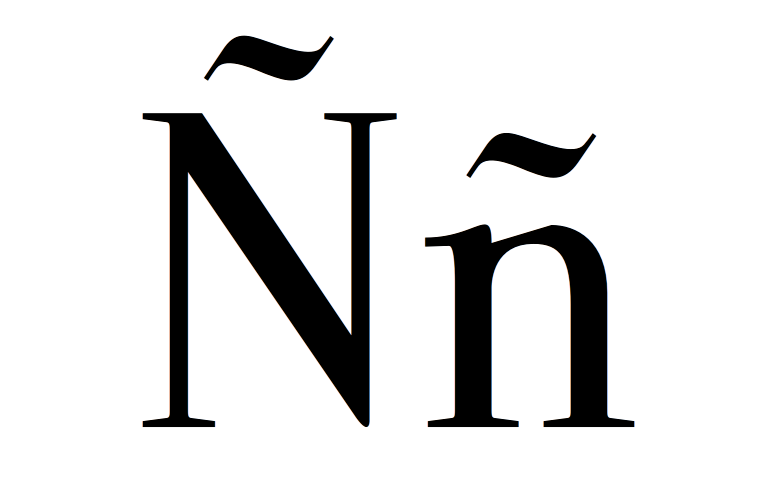
The coding of web pages (charset) is a recurring problem for webmasters, because:
- It depends on the editor in which the web was made, if we work by default in UTF-8 or ISO-8859-1. If the original file was written in ISO-8859-1 and we edit it in UTF-8, we will see the badly encoded special characters. If we save that file as is, we will be corrupting the original encoding (it will be saved wrong, with UTF-8). And vice versa.
- It depends on the Apache configuration.
- It depends on whether there is a hidden .htaccess file in the root directory that our website serves (httpdocs, public_html or similar)
- It depends on whether it is specified in the META tags of the resulting HTML.
- It depends on whether it is specified in the header of a PHP file.
- It depends on the charset chosen in the database (if a database is used to display content with a CMS, such as Joomla, Drupal, phpNuke, or a proprietary application that is dynamic).
In general, if accents or eñes never have to appear on our website, we are indifferent to the coding (although there may be other symbols that annoy us). Although if our website is in Spanish, the most normal thing is that we place accents and eñes. For this, the HTML standard is prepared to place all the symbols and accents that are necessary, encoding them. Thus, for accents and eñes, we should place:
á -> á
é -> é
í -> í
or -> or
ú -> ú
ñ -> ñ
Valencian-Catalan-Balearic variants for open accents:
à -> à
è -> è
ò -> ò
In this way, we will see all characters correctly, regardless of the charset.
However, it can be tedious for certain content to have to manually translate the characters ourselves. It is in these cases where it is worth spending a little time adjusting the different settings.
First, it would be necessary to determine on our website with the META tags that our website should be served in the encoding that we choose. That is, within:
<meta http-equiv=”Content-Type” content=”text/html; charset=UTF-8″ />
O well
<meta http-equiv=”Content-Type” content=”text/html; charset=ISO-8859-1″ />
If we continue with the problem, Second, see if the server (apache) has a predefined charset by default. If so, the META tags in the html will be ignored.
On a Linux server, the charset file is at:
/etc/apache2/conf.d/charset
can also be changed in the file httpd.conf
It should appear only “AddDefaultCharset off”, para que haga caso de las etiquetas META (lo ideal). Podemos poner, por ejemplo, “AddDefaultCharset UTF-8”, y así apache siempre emitirá las webs en UTF-8. El problema es que esto afecta a todo el servidor, y si luego tenemos alguna web que vaya a usar otra codificación tendremos un problema. Por eso, lo ideal es que esté a Off y que cada web defina cómo quiere mostrarse.
But it may be the case that we are not the server administrators and we only have a Plesk, and we cannot access the charset file because it is outside our range of permissions. We can then ask the server administrator to set the previous parameter to Off, or else ...
Alternative 1: Drop a file .htaccess in the root directory of the web
The .htaccess they are configuration files that overwrite some apache configurations only for certain cases. Keep in mind that these files:
- They can work totally or partially, depending on the configuration of the server (security question).
- Son archivos ocultos, por lo que para verlos tenéis que tener habilitada la función “ver archivos ocultos” en vuestro programa que acceda por ftp.
This file .htaccess should have at least one such line
AddDefaultCharset utf-8
Alternative 2: Put a directive in php that forces it to be displayed in the desired encoding
Esto es, sólo sirve si el archivo tiene extensión “.php”. Recordemos que el html y el php pueden convivir en el mismo fichero, con lo que si renombramos un “.html” a “.php”, el resutlado es exactamente el mismo (si tenemos instalado el php en nuestro servidor, claro está).
In the first line of the file that we want to indicate the encoding (or as soon as possible) you should place the following header:
<?php

header ('Content-Type: text / html; charset = UTF-8');

?>












No Comment