


Today we will learn to connect by FTP to our Hosting account.
What we will need for the connection is the following information that your Hosting Provider can provide you.
Server Name: the domain to which we want to connect, or if we do not have the domain, we can put the IP.
Username: this box corresponds to the FTP user.
Password: the password of the FTP user, always respecting the upper and lower case. The most advisable thing is to make a copy and paste of the password (we have to be careful not to copy blank spaces, since they are considered as a character).
Port: FTP is the protocol that we will always have to use in order to connect with our accommodation. By default it is 21. If we have SFTP activated, the port will be 22.
Here I add an example of an FTP connection with the required data discussed above.


Once the session is started, it will show us the files of the hosting as in the image shows.

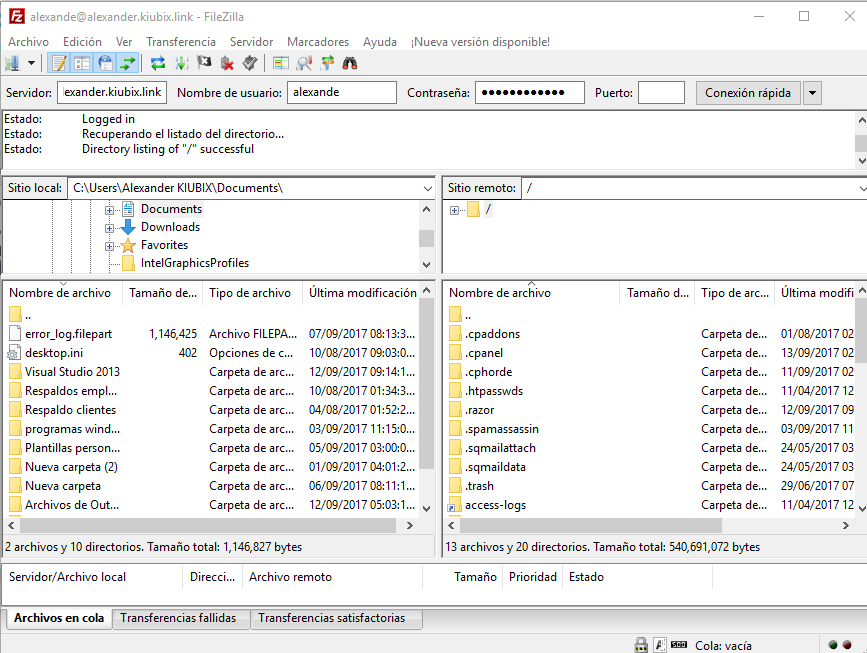
On the left, we see a window with the files located on our computer. Where we can navigate to find the files and / or directories that we want to upload to the WEB. While on the right, we visualize a window with the files located in our accommodation, among which we will find the WEB folder which is where we have to enter the content of our website, since it corresponds to the root of the website.
To upload the files and / or directories to the server we only have to select them and drag them to the directory that we want.
Debemos tener en cuenta los siguientes datos. El primero es que el archivo principal de la carpeta web tiene que llamarse “index” este archivo puede tener multiples extensiones pero las más utilizadas son index.htm e index.html. Esto es necesario porque el servidor web está configurado para mostrar por defecto el contenido del index.html, con lo que al poner el nombre de nuestro dominio en internet no hace falta que pongámos nada más. El segundo, es que dentro de la carpeta web pueden crearse otras carpetas y cada carpeta deberá contener su archivo index.html, esto no es obligatorio, pero si muy recomendable para tener una estructura de archivos lo más correcta posible.
With this we can manipulate the data or information found in our Hosting account.












No Comment